
Exploring the Artifakt Lo-Fi Element's GLITCH Engine

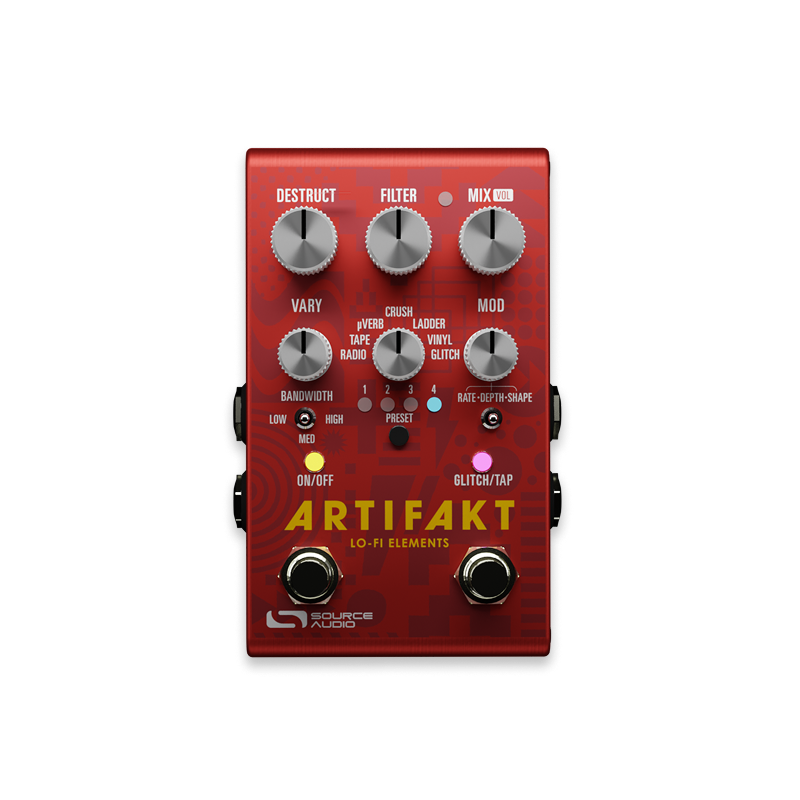
In the summer of 2024 we released the Artifakt Lo-Fi Elements, our one-of-a-kind pedal that covers the many sounds that fall under the umbrella of “lo-fi.” Effects in Artifakt include radio and vinyl simulations, tape saturation, tape warble, Belton Brick style reverb, bit crushing, sample rate reduction, a ladder filter, and glitch effects. From there you can push the sonic capabilities even further with Artifakt's ability to combine many of these effects. It's a powerful tool and the popularity of Artifakt continues to grow among musicians from all types of genres including indie, pop, shoegaze, post-rock, dance, hip-hop and much more.
We recently produced a video that explores the wide range of possibilities within the Artifakt's GLITCH engine. In the video takes us on a knob-by-knob tour of the GLITCH engine to help everyone get the most out of this fun and exploratory effect.
What Do the Knobs Do?
DESTRUCT: This knob controls the drive level applied to the dry signal and the glitch repeats.
FILTER: Adjusts the cut-off point of the Ladder filter. Turn it to the right for a brighter sound and to the left for a darker sound. This is a Ladder filter, which is quite a dramatic effect. Frequencies are cut very aggressively as the knob sweeps from right to left. When the knob reaches the full counter-clockwise position all frequencies will be cut, essentially silencing the entire output.
MIX: This knob adjust the ratio between the dry and glitch repeats.
VARY: The envelope is controlled by this knob. Basically it changes the sensitivity to the input signal. As you turn the knob further to the right, you will need to play louder to overtake the glitching. Increasing the sensitivity of the envelope is a nice way to more dramatically intertwine the glitch with your dry signal.
MOD: This knob works in tandem with the MOD toggle switch. Moving the toggle switch will automatically assign one of its three parameters to the knob. The three parameters are as follows:
RATE: When the toggle switch is set to the left, the MOD knob controls the Rate of the glitch. So as you turn the knob to the right the glitch will jump faster between intervals.
DEPTH: Set the toggle switch to the center position to assign DEPTH to the MOD knob. If you turn the knob all the way to the left, the glitch effect will remain at the original pitch, similar to a delay or looper pedal. As you turn the knob to 12 o'clock the glitch loop will add intervals above the the root note. As you turn the knob to the right of 12 o'clock, the glitch loop adds intervals below the root note.
SHAPE: When the toggle switch is set to the right most position, the MOD knob controls the different glitch interval patterns. This is not a continuous controller, rather it will jump to the different interval patterns at different positions on the knob. Below is a list of the available interval patterns and their position on the knob.
POSITION 1: (All the way to the left on the knob) - Octaves
POSITION 2: (Between 8 and 9 o'clock on the knob) - Octaves & 5ths
POSITION 3: (Between 9 and 10 o'clock on the knob) - Major Triad
POSITION 4: (Between 10 and 11 o'clock on the knob) - Minor Triad
POSITION 5: (Around 12 o'clock on the knob) - Major Scale
POSITION 6: (Between 1 and 2 o'clock on the knob) - Minor Scale
POSITION 7: (Between 2 and 3 o'clock on the knob) - Minor Scale
POSITION 8: (Between 3 and 4 o'clock on the knob) - Chromatic Scale
POSITION 9: (All the way to the right on the knob) - Minor Scale
OPTION/TAP SWITCH: The OPTION/TAP footswitch has two functions. If you press and hold the footswitch you will hear a "tape slowdown" effect on the glitch. So when you press down the you will hear a pitch dive-bomb until the glitching stops completely. It is similar to the sound of manually slowing down a tape of recorded music. When you release the footswitch you will hear the opposite effect (a rise in pitch) as the glitch loop ramps back up.
The second function of the OPTION/TAP footswitch stops and erases the glitch effect. To stop the glitch, simply tap the footswitch.
Of course, the Neuro app adds even more flexibility to the OPTION/TAP switch. By setting the Glitch Hold Mode to "Manual Hold" and assigning the footswitch function to "Glitch Hold – Momentary," you can configure Artifakt to engage the glitch effect only while the OPTION switch is held down. Whatever your preference is, Artifakt offers the flexibility to adapt to your needs.
We hope you find this information helpful in your understanding of how to navigate the Artifakt's GLITCH engine. Have fun with it! If you have any questions please email us at contact@sourceaudio.net. We would love to hear from you!
Leave a comment
This site is protected by hCaptcha and the hCaptcha Privacy Policy and Terms of Service apply.