Using Expression Pedals with Small-Format One Series Pedals
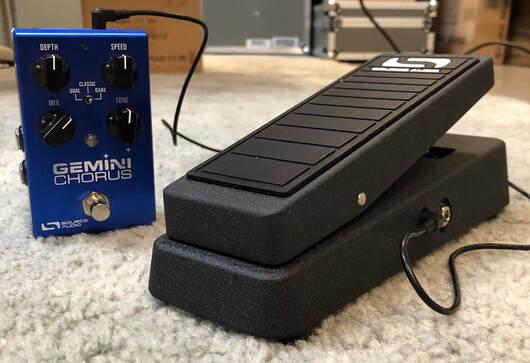
Our smaller, single-footswitch One Series pedals pack a lot of features into a pedalboard-friendly enclosure, but one thing that is often unclear to many users is…how can I hook up an expression pedal to these things?! Good news...you have a few options!
Source Audio Dual Expression Pedal
In order to conserve space on the small One Series format, we armed each pedal with a multi-purpose “Control Input” jack—a 1/8” TRRS port located on the top of the pedal, to the right of the power jack. The 1/8” port on the Dual Expression Pedal is specifically configured for this input, making it a perfect match for your One Series pedal(s).
LEARN MORE ABOUT THE DUAL EXPRESSION PEDAL
Source Audio Neuro Hub Expression Input
The Neuro Hub is the gateway into using our pedals as an ecosystem; a cohesive, working unit. It is compatible with all our One Series products. An advantage of the Neuro Hub is that is boasts a full 1/4” EXP IN port. You can plug a standard expression pedal into the Hub, which will convert it to 1/8” TRRS signal to your One Series pedal(s).
LEARN MORE ABOUT THE Neuro Hub
3rd Party Expression Pedal + Stereo RCA Cables
In the photos below, examine how to utilize stereo RCA to TRS cables to connect a 3rd party expression pedal to our One Series pedals. The purpose of this connection is that most pedals accept expression signal on the tip of a TRS cable, but the One Series wants to accept the signal on the ring. Using the red + white RCA cables in the video will allow you to swap the tip and the ring connections. This is a great workaround if you already have a 3rd party expression pedal and would like to check its compatibility with a One Series pedal.
Note: When calibrating the expression pedal, this method calls for swapping the Min and Max values (set the maximum value first, then the minimum).
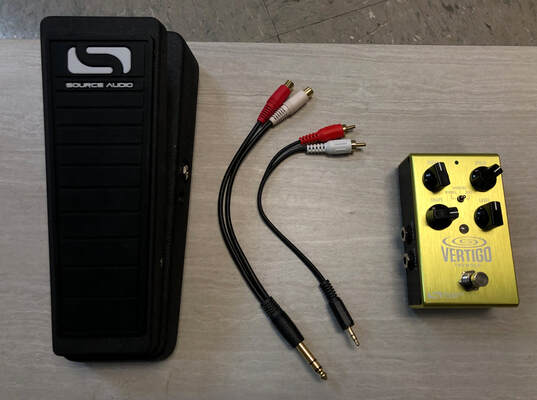
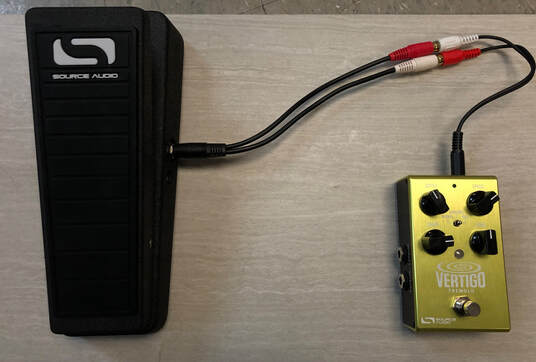
The method detailed above will work with most 3rd party expression pedals. On the C4 and Spectrum, the CONTROL INPUT button is used for extra parameter control. Instead of the manual calibration method, you’ll need to head to the Neuro Desktop Editor, scroll to the bottom of the editor, and swap the Min % and Max % values for Expression Input.

Now that you have all the tools to use an expression pedal with One Series pedals, Express Yourself!
As always, feel free to reach out to us at [email protected] for any further questions, comments, concerns or suggestions.