Editors & Firmware
Download the latest editing software and pedal firmware.
Editors & Firmware
DOWNLOAD THE NEURO 3 MOBILE APP FOR ANDROID OR iOS - Version 3.5.16 (Updated 07/01//25)



NEURO 3 DESKTOP EDITOR - FOR USE WITH ALL ONE SERIES PEDALS & THE NEURO HUB
Neuro 3 is an all-in-one application that supports all Source Audio effect pedals with USB ports. It also connects to the USB port of the Neuro Hub and provides editing capabilities to all pedals connected to the Hub. Create and manage presets, edit hardware options and MIDI mappings, and backup your presets and settings while connected to multiple pedals at once. Connect to a Neuro 3 Mobile App account directly through the Neuro 3 Desktop Editor to access a cloud-based library and browse community-created presets.
One Series firmware (Artifakt, Atlas Compressor, EQ2, Ultrawaves, Collider Delay+Reverb, Ventris Dual Reverb, Nemesis Delay, C4 Synth, Spectrum Intelligent Filter, L.A. Lady Overdrive, Kingmaker Fuzz, Aftershock Bass Distortion, Lunar Phaser, Gemini Chorus, Mercury Flanger, Vertigo Tremolo, and True Spring Reverb) is included with the Neuro Desktop Editor software download. To update a pedal, connect it to the Neuro Desktop Editor over USB and select the arrow icon. The editor will periodically check for new updates when connected to wi-fi.
NOTE: The Soleman MIDI Foot Controller is not yet supported. Please use the Soleman Editor instead.
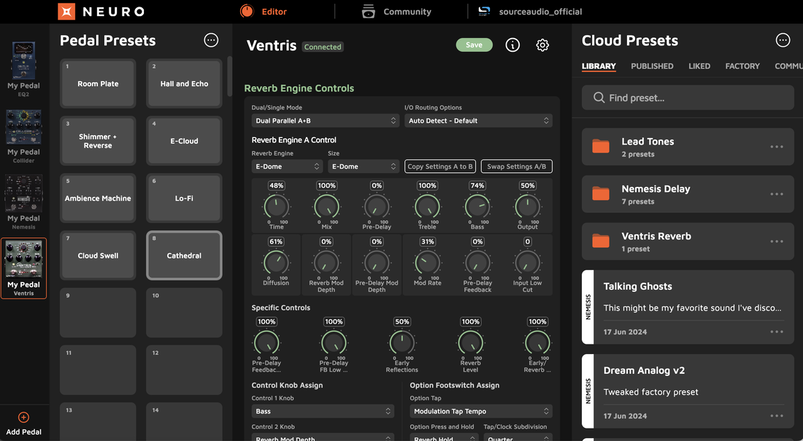
Download the Neuro 3 Desktop Editor for Mac or Windows
Version 3.0.29 - Updated 08/26/25



Old Versions of Neuro
Neuro Desktop Version 0.8.86 adds basic support for Artifakt editing and cloud presets.
Please note that if your Neuro account was created using Neuro 3, you may have issues logging into the legacy version of Neuro Desktop.
If you're having trouble logging into your account, please contact us so we can help resolve it.
Neuro Desktop 0.8.86 for Mac
Neuro Desktop 0.8.86 for Windows

| neuro_desktop_0_8_86a_installer_mac.pkg | |
| File Size: | 23450 kb |
| File Type: | pkg |
| neuro_desktop_0_8_86_installer_win.exe | |
| File Size: | 12307 kb |
| File Type: | exe |
Neuro Desktop 0.8.71 for Mac
*Note issues with macOS 14 (Sonoma) have been resolved remotely, no application update necessary
Neuro Desktop 0.8.71 for Windows
Minimum OS requirements: Windows 10
| neuro_desktop_0_8_71_installer_mac.pkg | |
| File Size: | 22969 kb |
| File Type: | pkg |
| neuro_desktop_0_8_71_installer_win.exe | |
| File Size: | 12007 kb |
| File Type: | exe |
Neuro Desktop 0.8.71 Release Notes

| neuro_desktop_0_8_71_release_notes.txt | |
| File Size: | 0 kb |
| File Type: | txt |
Download File Features added with version 0.8.71
- Support for Nemesis ADT added
- Improvements and fixes
Features added with version 0.8.60
- Major improvement to USB connection handling to fix issues users were experiencing with newer computers. Both Mac and Windows.
- Nemesis firmware update to 1.25
- Neuro Hub firmware update to 1.21
- EQ2 beta firmware 1.20
- Improvements and fixes
UPDATING ONE SERIES PEDAL FIRMWARE:
Periodically, your ONE SERIES pedal may require a firmware update. To update your pedal's firmware, perform the following procedure:
- Download the latest version of the Neuro Desktop Editor for Mac or Windows (see above).
- Open the Neuro Desktop Editor and connect your One Series pedal with a USB Type A male to mini Type B male cable.
- If the Firmware Update icon (the "arrow" icon) in the top left corner of the Neuro interface is framed in yellow, an update is suggested.
- Click the Firmware Update icon and follow the prompts.
The following are the latest firmware versions of each Source Audio One Series pedal: Atlas Compressor - 1.12 / EQ2 - 1.21 / Collider Delay+Reverb - 1.16 / C4 Synth - 1.22 / Spectrum Intelligent Filter - 1.11 / True Spring Reverb - 1.09 / Ventris Dual Reverb - 1.25 / Nemesis Delay - 1.25 / L.A. Lady Overdrive - 1.05 / Kingmaker Fuzz - 1.05 / Aftershock Bass Distortion - 1.05 / Gemini Chorus - 1.10 / Mercury Flanger - 1.10 / Lunar Phaser - 1.10 / Vertigo Tremolo - 1.11 / Neuro Hub - 1.21
Additional Editors and Firmware
Click on the "+" symbols below for download links and additional information on Source Audio Editors and Firmware.
FIRMWARE REVISION HISTORY
Nemesis Delay Update Guide and Firmware Revision History
Ventris Dual Reverb Update Guide and Firmware Revision History
True Spring Reverb Update Guide and Firmware Revision History
C4 Synth Update Guide and Firmware Revision History
Collider Delay+Reverb Update Guide and Firmware Revision History
Spectrum Intelligent Filter Update Guide and Firmware Revision History
EQ2 Programmable Equalizer Update Guide and Firmware Revision History
Atlas Compressor Update Guide and Firmware Revision History
Soleman Editor
The Soleman Editor is an essential application for advanced editing of the Soleman MIDI Footswitch. Use the editor to quickly edit names, configure settings, and create custom MIDI messages. The application can also be used to update the device firmware as well as creating full device backup memory images.
The latest Soleman firmware (version 1.10) can be downloaded below. The update addresses issues with the Tap Tempo functions in Set List and Panel modes.
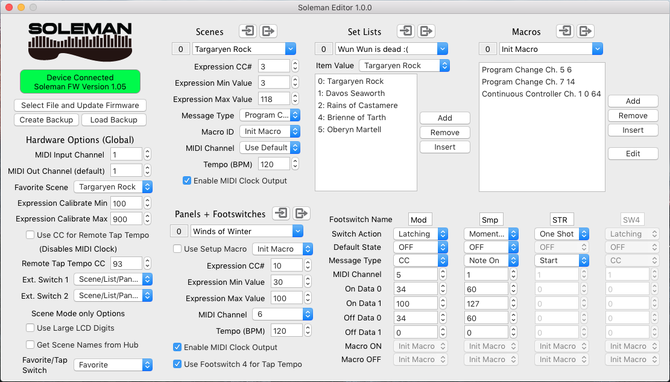
Soleman Editor 1.0.3 for Windows
Minimum requirement: Windows 7

| soleman_editor_1_0_3_installer_win.exe | |
| File Size: | 5051 kb |
| File Type: | exe |
Soleman Editor 1.0.41 for Mac (64-bit)
Minimum requirement: MacOS 10.7
| soleman_editor_1_0_41_installer_mac.pkg | |
| File Size: | 2729 kb |
| File Type: | pkg |
Soleman Editor 1.0.3/1.0.4 Release Notes
| soleman_editor_1_0_3_release_notes.txt | |
| File Size: | 1 kb |
| File Type: | txt |
| soleman_editor_1_0_4_release_notes.txt | |
| File Size: | 1 kb |
| File Type: | txt |
Soleman Firmware 1.10
| soleman_fw_1_10_3.hex | |
| File Size: | 161 kb |
| File Type: | hex |
REFLEX UPDATER APPLICATION
The most recent Reflex firmware update file (1.15) is now included in the Neuro Desktop Editor. Please note that the Reflex was discontinued in 2018 and will most likely already be up to date on firmware.
hot hand usb editor
Create and edit control presets, tweak signals, and assign MIDI messages in the Hot Hand USB Editor. Burn settings to the USB Receiver and recall them automatically for performances.
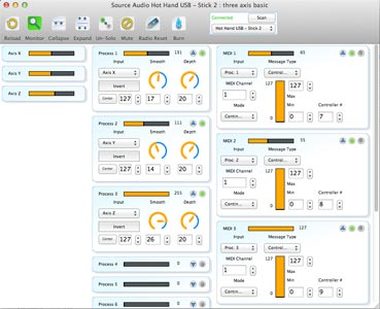
Hot Hand USB Editor for Windows 1.0.46

| HotHandUSB_installer_Windows_1_0_46c.zip | |
| File Size: | 3236 kb |
| File Type: | zip |
Hot Hand USB Editor for Mac 1.0.47 (64-bit)
Note: Dark Mode is not supported
| hot_hand_usb_installer_1_0_47b_mac.pkg | |
| File Size: | 5119 kb |
| File Type: | pkg |
Hot Hand USB Firmware
| hot_hand_usb_firmware_1_20.hex.zip | |
| File Size: | 21 kb |
| File Type: | zip |